A Professional Way to Get Paid for Your Creative Work
*Free & Easy - no hidden fees.
 Call For Demo 9168696091/92/93








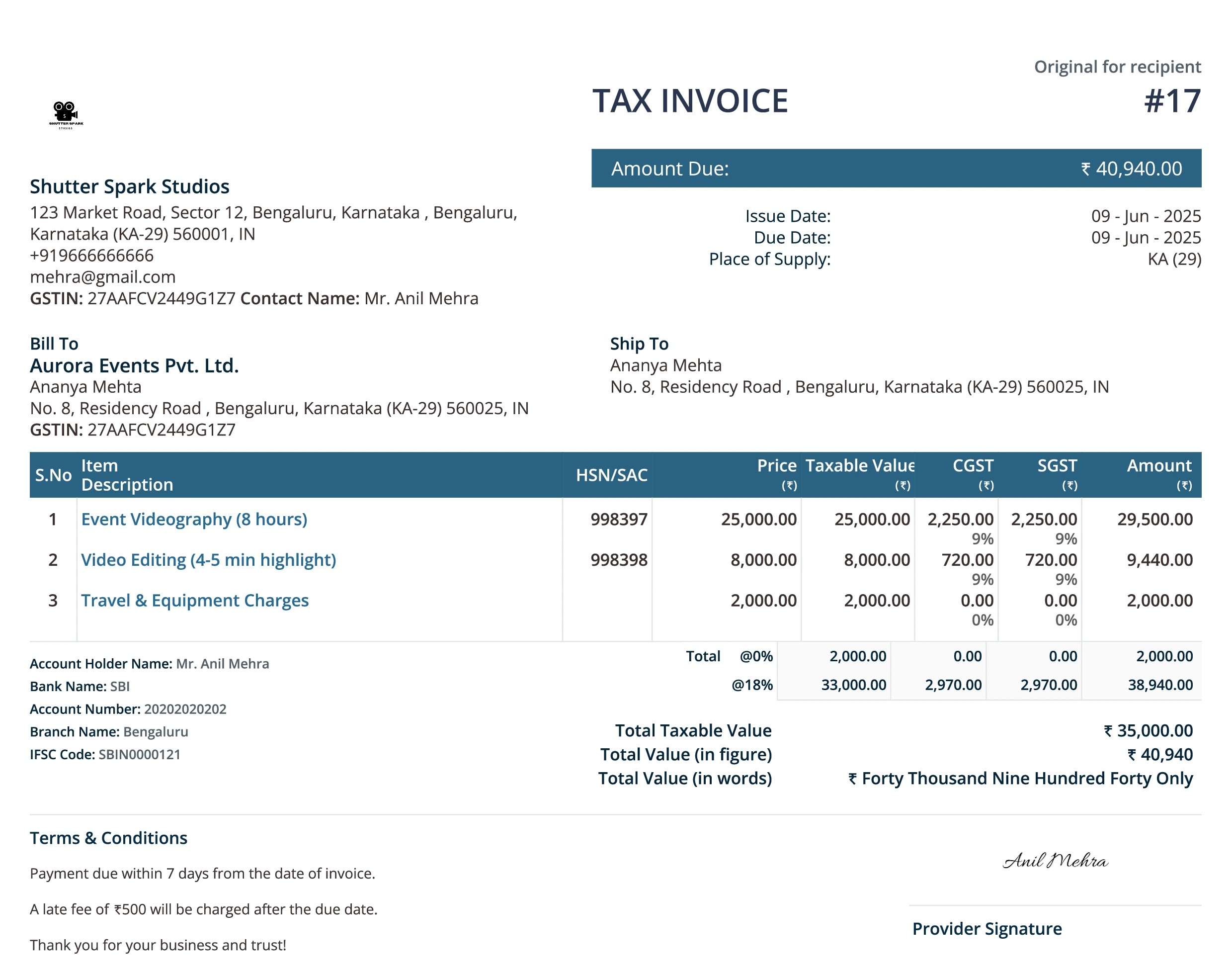
In the world of video production, where creativity and storytelling take center stage, administrative tasks like billing can feel like an unwanted distraction. That’s why having a reliable videography invoice template is essential for freelancers, editors, and video production companies. It helps you present your services professionally, get paid faster, and maintain tax-compliant records—all while saving time.
With tools like Sleek Bill, invoicing becomes a streamlined and efficient process. Whether you're charging for filming a wedding, editing a corporate video, or handling post-production for a documentary, using a structured invoice ensures clarity, consistency, and professionalism.
Using a generic invoice format can lead to confusion or even delayed payments. A tailored video production invoice ensures:
Transparency in pricing and service scope
Professional communication with clients
Faster payments and improved cash flow
Easier income tracking for tax filing
Organized client account management
It also helps you showcase your brand identity, track outstanding payments, and keep your finances under control—without hiring a dedicated accountant.
To create an effective invoice for video production, it’s important to be both detailed and clear. Here's what to include:
Instead of a single line item, list services like:
Location scouting or setup
Video shooting (mention the number of hours/days)
Editing and color grading
Motion graphics, voiceovers, or subtitling
Equipment rental or assistant fees
Sleek Bill helps you:
Create predefined service templates
Apply taxes like GST automatically
Customize templates with your logo and branding
Convert quotes into invoices with a single click
Include:
Accepted payment modes (bank transfer, UPI, wallets)
Payment due date
Any advance received or outstanding balance
Late payment penalties (if applicable)

Identifying the invoice type that aligns with your service model can help elevate your professionalism and streamline your business operations:
| Invoice Type | Use Case Example |
|---|---|
| Standard Invoice | After delivering a project like an ad shoot or music video | Recurring Invoice | Monthly video editing for a YouTube channel or content agency |
| Time-Based Invoice | Hourly billing for editing or post-production |
| Prepayment Invoice | Collecting upfront for large projects such as weddings |
| Credit Memo | Issued for overpayments or refunds |
| Debit Invoice | Additional charges for extra edits or services |
| Mixed Invoice | Combines videography, editing, and late fees into one bill |
Sleek Bill offers more than just a form—it provides a complete invoicing solution:
Generate and send invoices quickly, helping to accelerate your payment process.
Insert your logo, select a design that fits, and tailor your invoices to match your branding style.
Bill international customers using multiple currencies like USD, EUR, or GBP, supported by real-time exchange rate features.
Automatically calculate and apply GST and other applicable taxes to stay compliant and organized.
Send automatic follow-ups on pending invoices to ensure you get paid without awkward conversations.
Every invoice is stored for easy access, audit readiness, and financial tracking.
To make your billing process as smooth as your post-production workflow:
Use predefined templates for common services to save time
Offer multiple payment options to improve client convenience
Keep a digital backup of every invoice
Always double-check details before sending
Maintain transparency with line-item pricing
Include full contact info and payment terms for better communication
Follow up consistently on overdue payments

For video professionals, a well-structured videography invoice template is more than just a billing document—it’s a powerful communication tool that showcases your professionalism and simplifies your financial management.
With intuitive software like Sleek Bill, you can focus more on storytelling and production, and less on paperwork and follow-ups.
Whether invoicing for a one-day shoot, a month-long editing project, or a recurring YouTube retainer, having the correct invoicing setup can speed up payments, ensure compliance, and boost your business's professional image.
 GST Export Invoice Format
Requirements for export invoice templates in GST.
 Credit Note Format
Why Need Credit Note?

Requirements for composition scheme documents.

GST features in online billing software.

Requirements for export invoice templates in GST.

Receipt of items or services for GST Exempt.

केंद्रीय वस्तु एवं सेवा कर

Receipt voucher record the receipt of payment.




Yes, with Sleek Bill, you can easily upload your business logo to the invoice template to create personalized and branded invoices.
Absolutely! Sleek Bill allows you to select from multiple currency options to create invoices for international clients with accurate pricing.
You can quickly create a customized video production invoice using Sleek Bill's invoice generator and download it as a PDF with just one click.
Once your invoice is ready, you can email the PDF directly to clients, print it, or share the invoice link for clients to download or print themselves.
 Free training & support
 60K Happy Customers Worldwide
 Serious about Security & Privacy
Simplify your billing process and get paid faster with our professional, easy-to-edit invoice template.
*Free & Easy - no hidden fees.
 Call Back Request